
Last updated on
Nov 7, 2026
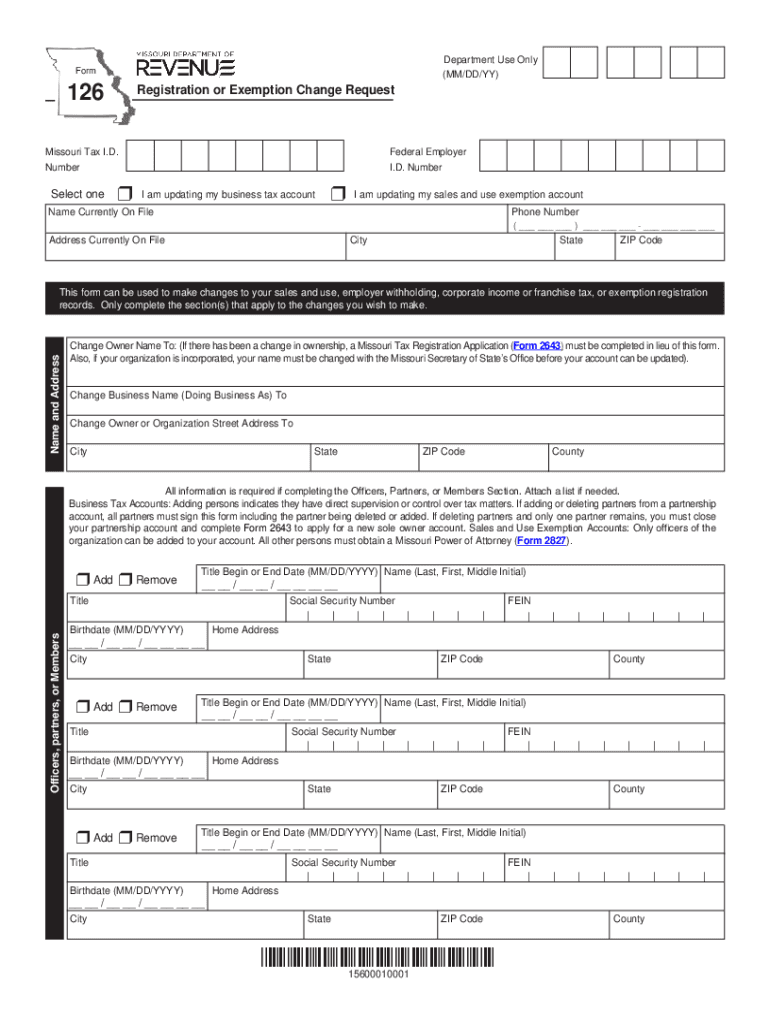
MO DOR Form 126 2022-2026 free printable template
pdfFiller is not affiliated with any government organization

Fill out
Complete the form online in a simple drag-and-drop editor.

eSign
Add your legally binding signature or send the form for signing.

Share
Share the form via a link, letting anyone fill it out from any device.

Export
Download, print, email, or move the form to your cloud storage.
Why pdfFiller is the best tool for your documents and forms


End-to-end document management
From editing and signing to collaboration and tracking, pdfFiller has everything you need to get your documents done quickly and efficiently.
Accessible from anywhere
pdfFiller is fully cloud-based. This means you can edit, sign, and share documents from anywhere using your computer, smartphone, or tablet.
Secure and compliant
pdfFiller lets you securely manage documents following global laws like ESIGN, CCPA, and GDPR. It's also HIPAA and SOC 2 compliant.
What is MO DOR Form 126
The Missouri Registration or Exemption Change Request Form 126 is a government document used by businesses to update their tax accounts and exemption statuses in Missouri.
pdfFiller scores top ratings on review platforms




useful and intuitive maybe a webinar later when I am not so swamped
PDFfiller is very convenient and easy to use
It is a great tool. I love what it has and I am excited to learn how to better utilize it
Customer Support is A++ They were able to help me resolve the alignment problem I was having!
I thought I was signing up for the $6 option, but found out it was actually the $20 one. A bit deceptive. So glad I found this site though. Too bad the original PDF designers didn't create PDFs with the option of converting to Word. So, despite the deceptive billing, I am still happy I found this site, and that the website is so easy to use.
this is just what i needed
this is just what i needed. Thanks
Who needs MO DOR Form 126?
Explore how professionals across industries use pdfFiller.

MO DOR Form 126 is needed by:
-
Business owners looking to update their registration details.
-
Partners in a business needing to change ownership information.
-
Officers of companies who must report organizational changes.
-
Members of LLCs requiring tax account updates.
-
Individuals managing sales and use exemption accounts.
Comprehensive Guide to MO DOR Form 126
What is the Missouri Registration or Exemption Change Request Form 126?
The Missouri Registration or Exemption Change Request Form 126 is essential for updating business tax accounts and sales/use exemption accounts in Missouri. This form enables businesses to make significant updates, including changes to the owner name, business name, and address. Filing this form is crucial for compliance with Missouri state regulations, ensuring that business information remains current and accurate.
Purpose and Benefits of Using the Missouri Registration or Exemption Change Request Form 126
This form offers several advantages for businesses. Keeping business records accurate and up-to-date helps avoid penalties or complications related to improper tax documentation. Additionally, utilizing this form streamlines the process for making necessary changes to business information, resulting in greater efficiency.
Who Needs the Missouri Registration or Exemption Change Request Form 126?
The following business roles are eligible to file the form:
-
Owners
-
Partners
-
Officers
-
Members
Scenarios that necessitate filing this form include changes like name alterations and address updates. It is also important for authorized representatives to provide their signatures on the form to validate the changes.
How to Fill Out the Missouri Registration or Exemption Change Request Form 126 Online
Filling out this form online involves several specific steps:
-
Access the form through a reliable platform like pdfFiller.
-
Enter your Missouri Tax I.D. and Federal Employer I.D. Number in the designated fields.
-
Complete the personal information section accurately, providing necessary details.
-
Review each section to ensure all information is correctly filled before submission.
Be mindful of common mistakes to avoid any delays in processing.
Key Features and Components of the Missouri Registration or Exemption Change Request Form 126
This form contains several critical sections:
-
Signature requirements for authorized representatives
-
Fields for personal and business information
-
Documentation requirements including the 'Name Currently On File'
-
Important fields like 'Change Business Name To'
Accuracy is paramount in these fields, as penalties exist for inaccuracies or omissions.
Submission Methods and Deadlines for the Missouri Registration or Exemption Change Request Form 126
Users have several submission options available:
-
Online submission via designated platforms
-
Mailing the completed form to the appropriate state office
It is essential to adhere to state regulations regarding submission deadlines, as late filing can lead to consequences. Understanding how to remedy late submissions can help alleviate potential issues.
Tracking Your Submission and What Happens After You Submit
After submitting the form, businesses can utilize tracking options to monitor the process. Users can expect varied processing times, along with notifications regarding approval or denial of their submission. If any corrections or amendments are needed, guidance is available to facilitate these changes.
Security and Compliance When Submitting the Missouri Registration or Exemption Change Request Form 126
When submitting this form, it is vital to ensure the security of sensitive information. pdfFiller employs robust security measures, including 256-bit encryption, to protect users’ data. Additionally, compliance with HIPAA and GDPR regulations reinforces the importance of safeguarding business information throughout the submission process.
How pdfFiller Can Help You with the Missouri Registration or Exemption Change Request Form 126
pdfFiller enhances the process of completing the Missouri Registration or Exemption Change Request Form 126 through its user-friendly platform. Key features include fillable forms, eSigning capabilities, and streamlined document management. Utilizing pdfFiller can significantly simplify form completion and submission for all users.
How to fill out the MO DOR Form 126
-
1.Start by accessing the Missouri Registration or Exemption Change Request Form 126 on pdfFiller. Visit the pdfFiller website and use the search bar to find the form by its name.
-
2.Once you open the form, familiarize yourself with its layout. The form contains multiple blank fields, checkboxes, and instructions. Make sure you understand where each piece of information goes.
-
3.Before filling out the form, gather all necessary information. This includes your Missouri Tax I.D., Federal Employer I.D. Number, and personal information for any officers, partners, or members.
-
4.Begin completing the form by filling in the 'Name Currently On File' and other relevant sections, such as 'Change Owner Name To' or 'Change Business Name (Doing Business As) To'. Use the fillable fields to input your information directly.
-
5.Ensure each field is filled out accurately to avoid any processing issues. Review your entries carefully for spelling mistakes or incorrect information.
-
6.After all required fields are completed, review the entire form again. Check that information is correct, consistent, and that all required signatures are present.
-
7.Once satisfied with your entries, you can save the form. Choose the option to download or submit the form directly through pdfFiller, following the onscreen prompts.

Who needs to complete the Missouri Registration or Exemption Change Request Form 126?
This form is required for business owners, partners, officers, and members of LLCs who need to update their tax account information, such as ownership details or exemption statuses in Missouri.
What information is needed to complete the form?
Prior to filling out the form, gather your Missouri Tax I.D., Federal Employer I.D., and personal details for any partners or officers involved in the business, like their social security numbers and addresses.
What are the submission methods for the form?
You can submit the Missouri Registration or Exemption Change Request Form 126 electronically via pdfFiller or download and mail a hard copy to the appropriate Missouri tax authority.
Are there deadlines for submitting this form?
While the form must be submitted promptly when changes occur, there are typically no strict deadlines. However, timely submissions ensure compliance with Missouri tax regulations.
What are common mistakes to avoid when filling out the form?
Common mistakes include omitting required information, misspelling names or tax IDs, and failing to provide necessary signatures. Always double-check your entries to avoid these errors.
How long does it take to process the form after submission?
Processing times can vary, but typically, updates to tax accounts in Missouri can take a few weeks. Always check for confirmatory details from the state office after submission.
Is notarization required for this form?
No, the Missouri Registration or Exemption Change Request Form 126 does not require notarization. However, it must be signed by the appropriate business representative.
MO DOR Form 126 Form Versions
Related Content
Related Forms


Get the latest insights from our blog


If you believe that this page should be taken down, please follow our DMCA take down process
here
.
This form may include fields for payment information. Data entered in these fields is not covered by PCI DSS compliance.